Managing donor relationships involves much more than recording donations. Nonprofits need to keep track of donor information, understand giving patterns, follow up on contributions, manage campaigns, and maintain consistent communication with supporters. When these activities are handled across spreadsheets and separate tools, important information can easily get overlooked.
The best donor management software brings these activities together in one place. It helps fundraising teams maintain accurate donor records, manage contributions, and make better decisions about donor engagement. For smaller nonprofits with limited staff and resources, the right system can also reduce administrative work and make everyday fundraising activities easier to manage.
But what features should you look for when comparing donor management platforms? Here are seven essential capabilities that can make a meaningful difference to your organization’s fundraising operations.
1. Centralized Donor Profiles and Giving History
A donor management system should provide a complete record of every donor in one place. Instead of searching through spreadsheets, email conversations, and separate donation records, your team should be able to access relevant information from a single profile.
A comprehensive donor profile should include:
- Donor contact information and communication preferences.
- Previous donations and total giving history.
- Pledge commitments and outstanding contributions.
- Notes from meetings, calls, and conversations.
- Campaigns and fundraising activities the donor has supported.
For example, suppose a nonprofit is preparing to contact a supporter who contributed to its annual fundraising campaign last year. Before reaching out, the development officer should be able to review the donor’s previous contributions, preferred communication method, and any earlier conversations.
This information helps the team approach the donor with relevant context instead of sending a generic request. It also ensures that when staff members change, important relationship information remains accessible to the rest of the team.
For small nonprofits, having one reliable donor database is particularly valuable because it reduces dependence on individual spreadsheets and manually maintained records.
2. Donation, Pledge, and Recurring Gift Tracking
Recording a donation is only one part of managing contributions. Nonprofits also need to monitor promised gifts, recurring payments, outstanding pledges, and contributions received through different channels.
The best donor management software should make it easy to track these activities without requiring staff to maintain separate records.
Look for features that support:
- Tracking one-time and recurring donations.
- Recording pledged amounts and payment schedules.
- Monitoring outstanding pledge balances.
- Recording online and offline contributions.
- Maintaining a complete transaction history for each donor.
Consider a nonprofit that receives a $1,200 annual pledge from a supporter, payable in four quarterly installments. The software should record the total commitment, track each installment as it arrives, and show the remaining balance.
Without this functionality, staff may need to check bank records, update spreadsheets, and manually contact donors about outstanding payments. This creates additional work and increases the possibility of missed follow-ups.
A system that keeps donation and pledge information updated helps fundraising teams maintain accurate records and gives them a clearer picture of expected contributions.
3. Donor Segmentation and Targeted Outreach
Not every donor has the same interests, giving capacity, or relationship with an organization. Sending the same fundraising message to every supporter may overlook these differences.
Donor segmentation allows nonprofits to group supporters based on relevant characteristics and develop more targeted communication strategies.
A good donor management platform should allow teams to create segments based on:
- Donation amount and giving frequency.
- Previous campaign participation.
- Donors who have stopped contributing.
- Recurring donors and major gift supporters.
- Donor interests and engagement history.
For instance, a nonprofit preparing a fundraising campaign for its education program may want to contact supporters who have previously contributed to similar initiatives. With donor segmentation, the team can create a list of these supporters and send them information that relates to their past interests.
Similarly, organizations can identify donors who contributed last year but have not yet given this year. This gives the development team an opportunity to reconnect with those supporters rather than waiting until the next fundraising campaign.
For organizations evaluating the best donor management software for small nonprofits, segmentation is especially useful. It helps smaller teams make better use of their existing donor database without spending hours manually sorting contact lists.
4. Automated Donor Communication and Stewardship
Maintaining donor relationships requires consistent communication. Acknowledging contributions, sharing campaign updates, sending reminders, and following up after events all contribute to a stronger donor experience.
However, managing every interaction manually can become difficult, particularly when a nonprofit has a small development team.
Look for donor management software that supports automated communication, including:
- Automatic donation acknowledgments and receipts.
- Thank-you emails following contributions.
- Reminders for upcoming or overdue pledge payments.
- Follow-up messages for recurring donations.
- Scheduled campaign updates and newsletters.
For example, when a supporter makes an online donation, the system should be able to trigger an acknowledgment without requiring a staff member to prepare and send an individual email.
Automation can also help teams maintain communication with recurring donors or supporters who have not contributed recently.
However, automation should not replace personal interaction. A thank-you email can be automated, but a conversation with a long-term supporter or a personalized update about a project they care about may require direct involvement from the development team.
The goal is to automate routine communication while giving staff more time to focus on meaningful donor relationships.
5. Online Giving and Recurring Donation Management
Online giving has become an important part of nonprofit fundraising. Supporters may want to contribute through a website, respond to an email campaign, or make regular donations without having to repeat the payment process each time.
The best donor management software should make it easy for organizations to accept and track contributions through online giving channels.
Important capabilities include:
- Mobile-friendly donation forms and giving pages.
- Support for one-time and recurring donations.
- Secure payment processing.
- Automatic recording of online contributions.
- Tracking of recurring payment schedules and failed payments.
For example, a nonprofit running an annual scholarship campaign may receive contributions from supporters in different locations. A mobile-friendly donation page allows people to contribute without having to contact the organization or complete a manual payment process.
Recurring donation functionality is equally important. Supporters should be able to commit to monthly or quarterly contributions, while the organization should be able to monitor those commitments and identify missed payments.
When online donations are automatically connected to donor records, staff do not have to enter the same information into multiple systems. This keeps contribution histories more accurate and makes it easier to track fundraising activity.
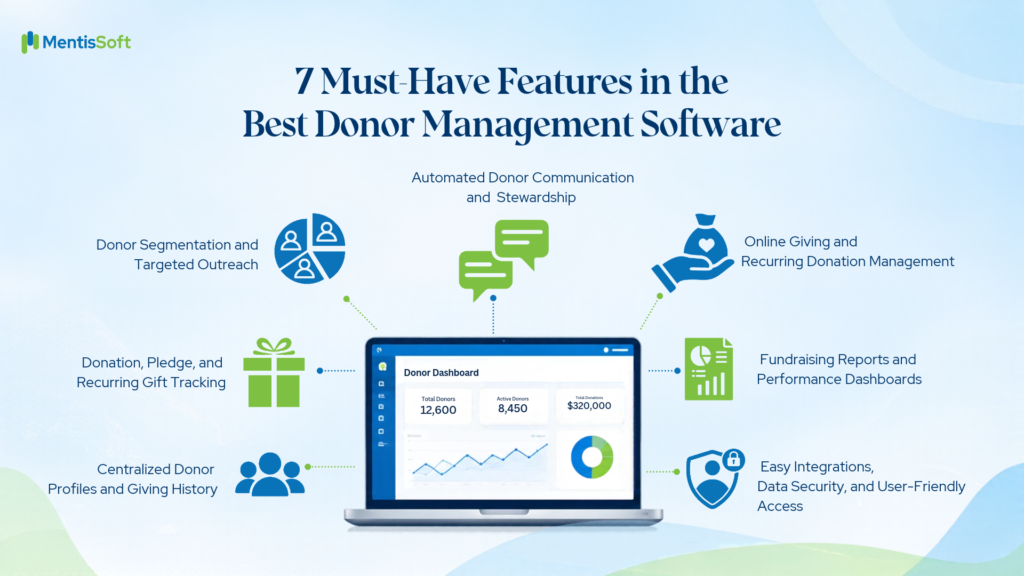
6. Fundraising Reports and Performance Dashboards
Collecting donor information is useful only when organizations can turn that information into meaningful insights. Fundraising teams need to understand where contributions are coming from, which campaigns are performing well, and how donor engagement is changing over time.
A donor management platform should provide reporting tools that help teams review their fundraising activities without manually compiling information from multiple spreadsheets.
Useful reporting capabilities include:
- Total donations received during a selected period.
- Contributions by donor, campaign, or fundraising activity.
- Recurring donation and pledge reports.
- Donor retention and re-engagement reports.
- Campaign progress against fundraising goals.
- Comparisons of fundraising performance across different periods.
For example, after completing an annual fundraising campaign, a development director may want to compare the total amount raised with the previous year’s results. They may also want to identify how many contributions came from first-time donors and how many came from existing supporters.
A well-designed reporting dashboard should make these figures accessible without requiring the team to export data and prepare reports manually.
For small nonprofits, clear reporting is particularly important because leadership often needs to understand fundraising performance without having a dedicated data analyst.
7. Easy Integrations, Data Security, and User-Friendly Access
Donor management software rarely works in isolation. Nonprofits often use separate tools for accounting, email marketing, online payments, event management, and other administrative activities.
If these systems do not communicate with one another, staff may end up entering the same information multiple times or reconciling records manually.
When evaluating a donor management platform, consider three practical requirements.
Integration with existing tools: The software should connect with relevant accounting systems, payment gateways, email platforms, and other tools your organization already uses. This helps information move between systems and reduces duplicate data entry.
Data security and access controls: Donor records contain personal and financial information that must be protected. Look for secure data storage, encrypted connections, appropriate user permissions, and reliable backup procedures. Also, check whether the platform supports the data protection requirements applicable to your organization.
Ease of use and accessibility: A system should be straightforward enough for staff members to use without extensive technical training. Cloud-based access and a mobile-friendly interface can also help team members review or update information when working outside the office.
These considerations are particularly important when choosing the best donor software for small nonprofits. A platform with extensive features may look attractive, but if it requires significant training, complicated configuration, or several additional tools, it may create more work than it solves.
The right system should fit into your existing operations and make everyday fundraising tasks easier to manage.
How to Choose the Right Donor Management Software for Your Nonprofit
Having the right features is important, but not every nonprofit needs the same level of functionality. A small organization managing a few fundraising campaigns will have different requirements from an established nonprofit handling thousands of donor records and multiple fundraising programs.
Before choosing a platform, consider the following questions:
- Does it fit your fundraising process? Make sure the software supports the types of contributions, campaigns, and donor relationships your organization manages.
- Can your team use it comfortably? Look for a straightforward interface and accessible training and support.
- Will it work with your existing tools? Check whether it integrates with your accounting, payment processing, and communication systems.
- Can it support future growth? Consider whether it can handle an expanding donor database, additional campaigns, and more complex reporting requirements.
- What is the total cost? Review subscription fees, implementation costs, payment processing charges, and additional costs for users or optional features.
It is also worth requesting a demonstration before making a decision. Ask the provider to show how common tasks work, such as adding a donor, recording a contribution, creating a donor segment, and generating a fundraising report.
This gives your team a better understanding of how the platform will fit into its daily operations.
Conclusion
The best donor management software should do more than store contact details and record contributions. It should help nonprofits maintain complete donor records, track giving activity, communicate consistently, understand fundraising performance, and manage their operations with less manual effort.
For smaller nonprofits, choosing a platform that combines essential features with ease of use and manageable costs is especially important. The right solution should support the way your team works today while giving your organization room to grow.
FundThrive by MentisSoft helps schools and nonprofits manage donor relationships, contributions, fundraising campaigns, and reporting in one platform. With centralized donor profiles, segmentation, communication tools, and fundraising insights, it helps development teams spend less time managing records and more time building stronger donor relationships.
Explore FundThrive’s donor management software to learn how it can support your fundraising operations.
Frequently Asked Questions
1. What is the difference between donor management software and fundraising software?
Donor management software primarily focuses on maintaining donor records, tracking giving history, and managing supporter relationships. Fundraising software generally covers a broader range of activities, including campaign planning, online donations, event fundraising, and contribution tracking. Many modern platforms combine both capabilities.
2. Can small nonprofits use donor management software instead of spreadsheets?
Yes. Donor management software can replace manually maintained spreadsheets with a centralized database that keeps donor information, contributions, and communication records organized. It also makes it easier for multiple team members to access and update information.
3. How much does donor management software cost?
Pricing varies depending on the platform, number of donor records, available features, and number of users. Some providers offer free or low-cost plans, while more comprehensive systems may charge subscription or implementation fees. Nonprofits should also check for additional payment processing and transaction charges.
4. How do nonprofits move existing donor records into a new system?
Most donor management platforms support data imports through spreadsheets or CSV files. Before migrating, organizations should review existing records, remove duplicates, standardize contact information, and verify donation histories. It is also important to check how the new platform handles historical contributions and communication records.
5. Can donor management software help improve donor retention?
Yes. By keeping giving histories, communication records, and engagement activities together, the software helps development teams identify donors who may need follow-up. Segmentation and automated reminders can also support timely communication, helping organizations maintain stronger relationships with existing supporters.