What is the best CRM for nonprofits?
The best nonprofit CRM is one that maintains complete donor records, supports the way your organization raises funds, is easy for staff to use, connects with your existing tools, provides clear reports, keeps donor data secure, and comes with a predictable total cost. It should help your team manage donor relationships and fundraising activities without creating unnecessary administrative work.
Finding the right platform requires understanding how the software will support your organization’s daily operations. The eight factors below explain what to evaluate before making your decision.
1. What problems do you need a CRM to solve?
Before comparing software platforms, identify the challenges your organization wants to solve. A CRM should address practical problems that affect your fundraising operations. Start by reviewing how donor information is currently stored, how gifts are recorded, and how follow-ups and acknowledgments are handled. Consider whether reporting requires too much manual work or whether tracking campaigns across different stages has become difficult.
Once you have identified these challenges, prioritize the two or three that have the greatest impact on your team. These priorities will help you evaluate each platform consistently during vendor demonstrations. For example, an organization struggling to keep donor records accurate should prioritize contact management and duplicate detection over advanced event management features. This approach keeps the selection process focused on improvements your team needs immediately.
2. Does it give you a complete view of every supporter?
A nonprofit CRM should bring all relevant supporter information together in one accessible profile. This includes donor contact details, giving history, communication records, outstanding pledges, and engagement activities such as volunteering or event attendance. Having these details in one place helps staff understand a supporter’s relationship with the organization before making contact. It also reduces the need to search through multiple systems or manually combine information.
A structured donor management system can help organizations maintain these records and make donor information accessible across the team.
For example, a staff member preparing for a donor call should be able to review previous contributions, open pledges, campaign participation, and past conversations from a single profile. This gives the staff member useful context for the discussion and helps ensure that communication reflects the donor’s history with the organization.
When several people handle fundraising, communications, and stewardship, shared profiles keep outreach consistent, prevent missed follow-ups and duplicate contact, and make handovers easier when responsibilities change.
3. Does it support the way you raise funds?
Every nonprofit has its own fundraising approach, and the CRM you choose should fit those activities. Some organizations primarily depend on annual giving campaigns, while others manage recurring donations, fundraising events, major gifts, peer-to-peer campaigns, and corporate sponsorships. These activities involve different processes and create different types of donor information that need to be recorded and tracked.
These activities are also closely connected to the donor cultivation process, which helps organizations build and maintain supporter relationships beyond individual campaigns.
Recurring donations, for example, require payment schedules and a way to identify failed transactions. Fundraising events involve registrations, ticket purchases, and attendee details, while major gift programs require relationship notes, giving commitments, and follow-up activities. Corporate contributions may also involve matching gift programs and pledges that are fulfilled over time. A CRM should provide the appropriate tools to manage these activities without forcing staff to keep separate records for each fundraising initiative. Every gift also needs an accurate acknowledgment. In the US, donors need a written acknowledgment from the organization to claim a tax deduction for any single gift of $250 or more, so confirm the CRM can generate tax receipts automatically.
When evaluating platforms, list the fundraising activities your organization currently manages and those it expects to introduce over the next two years. Ask vendors to demonstrate how each activity would be handled within their system. This will help you understand whether the platform can support your existing operations and your future fundraising plans.
4. Will your team actually use it every day?
The usefulness of a CRM depends largely on whether staff can work with it comfortably. Even a platform with extensive features can become difficult to manage if routine tasks involve too many steps or require unnecessary navigation. When staff find the system complicated, they may start maintaining separate notes or records, making it harder to keep donor information accurate and up to date.
During the evaluation process, involve the employees who will use the CRM most frequently, including development coordinators, gift processors, and fundraising staff. Ask them to complete everyday activities such as recording a donation, updating a donor profile, searching for a contribution, and generating an acknowledgment. Their experience will help identify areas where the system feels intuitive and where additional training or effort may be required.
Usability also includes how the platform manages access and supports staff after implementation. Role-based permissions allow organizations to control which information different users can view or update. Training and onboarding are equally important, so ask vendors whether these services are included in the subscription, how they are delivered, and what support remains available after the initial setup.
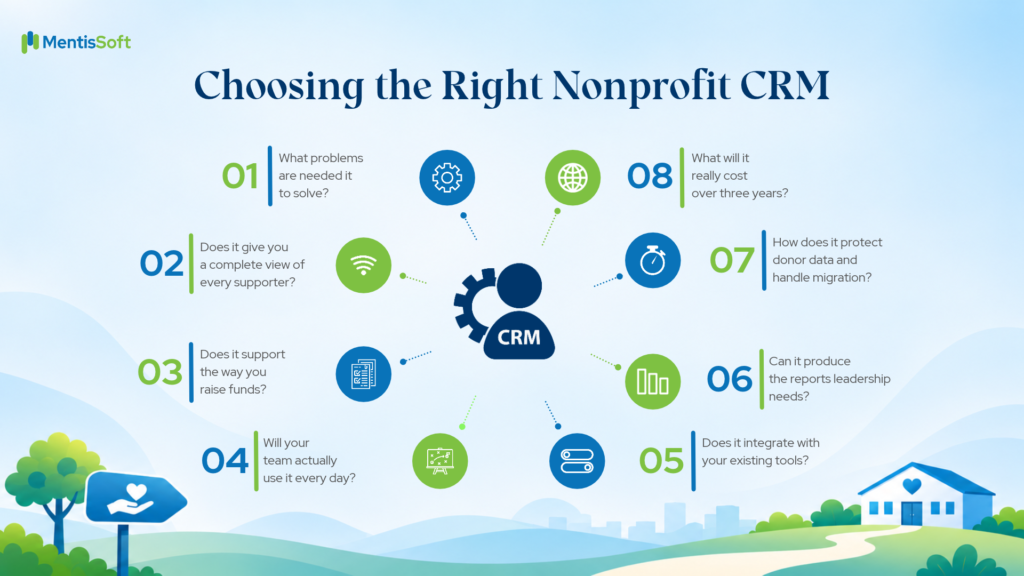
5. Does it integrate with the tools you already use?
Most nonprofits rely on multiple software platforms to manage their operations. Accounting, online donations, email marketing, and event registration may each be handled through separate systems. When these platforms do not communicate effectively, staff must transfer information manually, increasing administrative work, and the possibility of data entry errors.
Before selecting a CRM, understand how it will connect with the tools your organization already uses. For example, when someone donates through your website, the contribution should be recorded in the appropriate donor profile without requiring staff to enter the same information again. Similarly, donation records may need to flow into the accounting system so that finance staff can maintain accurate financial records.
Look at the actual functionality of each integration rather than general statements about compatibility. Ask vendors which applications their CRM connects with, what information can be exchanged, whether the connection works in both directions, and how frequently data is updated. These details will help you determine whether the integrations will support your existing workflows.
6. Can it produce the reports leadership needs?
A nonprofit CRM should help your team understand fundraising performance without requiring extensive manual preparation. Reporting is particularly important for development directors and organizational leaders who need accurate information to evaluate campaigns, monitor donor engagement, and plan future fundraising activities. The value of a reporting feature depends on how easily staff can retrieve the information they need.
Consider the questions your leadership team regularly asks. These may include donor retention rates, campaign performance, giving trends over several years, outstanding pledges, and progress toward annual fundraising goals. During vendor demonstrations, ask the provider to generate reports that answer these questions using sample data. Pay attention to whether the information is available through standard reports or requires additional customization and manual work.
Dashboards can provide a quick overview of important fundraising figures, while customizable reports allow teams to examine specific activities in greater detail. Reporting tools should also be accessible to the appropriate staff members rather than depending on one person to generate every report. This makes it easier for different departments to use the same information when reviewing performance and planning their next steps.
7. How does it protect donor data and handle migration?
Data security and migration are two important considerations that should be evaluated before signing a CRM contract. Nonprofit databases contain personal contact details, contribution histories, giving amounts, and sometimes payment-related information. Your organization needs to understand how the software provider protects these records and what safeguards are available to prevent unauthorized access or data loss.
Ask vendors about their security practices, including data encryption, user permissions, backup schedules, and procedures for responding to security incidents. Request written information about their data protection policies and ask for evidence of recognized standards, such as PCI DSS compliance for any card payments it handles and a SOC 2 report. Also check how access is managed when employees or volunteers join or leave the organization.
Data migration deserves the same level of attention. Moving existing donor information into a new CRM involves more than importing a contact list. Historical contributions, pledges, communication records, custom fields, and other details must be transferred accurately. Ask the vendor who will manage the migration, how duplicate and outdated records will be handled, and how the organization can verify that donor counts and contribution totals match the original database. A documented migration plan, with clear responsibilities and timelines, can make the transition considerably easier.
8. What will it really cost over three years?
The subscription price displayed on a CRM provider’s website may not represent the full cost of using the platform. Additional expenses can arise from user licenses, database size, optional modules, integrations, implementation, data migration, training, and ongoing support. These costs can vary depending on the size of your organization and the fundraising activities you need the software to support.
When comparing vendors, request a written estimate that covers the expected cost over the first three years. The estimate should reflect your actual requirements, including the number of users, the size of your donor database, and the features you intend to use. For example, an organization that needs event management, email marketing, and multiple staff accounts should understand whether these capabilities are included in the base subscription or require additional payments.
Consider how pricing changes as your organization grows. Ask vendors what happens when the donor database expands, additional staff members need access, or new fundraising activities are introduced. Understanding these pricing conditions in advance helps prevent unexpected expenses and makes it easier to plan the software budget over time. If a provider cannot clearly explain its pricing structure or provide a written estimate, that is worth considering before making a commitment.
How to make your final CRM choice
After evaluating these eight factors, your organization should have a clearer understanding of what each CRM offers and how well it matches your requirements. The next step is to compare the shortlisted platforms through hands-on testing.
Start by narrowing your options to two or three platforms that meet your most important requirements. Request a trial or sandbox environment from each provider and test a typical fundraising workflow. Have your staff repeat the everyday tasks from factor 4, this time using examples from your own fundraising activities, to see how each system performs in real situations.
Once the testing is complete, compare each platform’s suitability, implementation requirements, support services, and total cost. Score each platform against the two or three priorities you identified in factor 1, so the comparison stays objective, and ask each vendor for references from organizations similar to yours in size and fundraising approach.
A CRM that offers the largest number of features is not necessarily the best choice. What matters is how effectively it supports your organization’s operations, how easily staff can use it, and whether it can grow with your fundraising goals over time.
Choose a CRM that grows with your fundraising
A nonprofit CRM is a long-term investment that influences how your organization manages donor relationships, records contributions, and evaluates fundraising performance.
Taking the time to evaluate your options helps you decide based on your organization’s actual needs. A thoughtful selection process can reduce administrative work, improve access to donor information, and give your team a more consistent way to manage fundraising activities.
For schools and nonprofits looking for a platform that brings donor information and fundraising activities together, FundThrive offers donor management and fundraising capabilities in one place. It helps organizations manage online giving, campaigns, events, and donor records, making fundraising information easier to organize and access.
You can explore the FundThrive fundraising platform to learn more about its features and how it supports fundraising operations.